Issue with warp_template2mt.nii.gz and sct_warp_template

Hi,

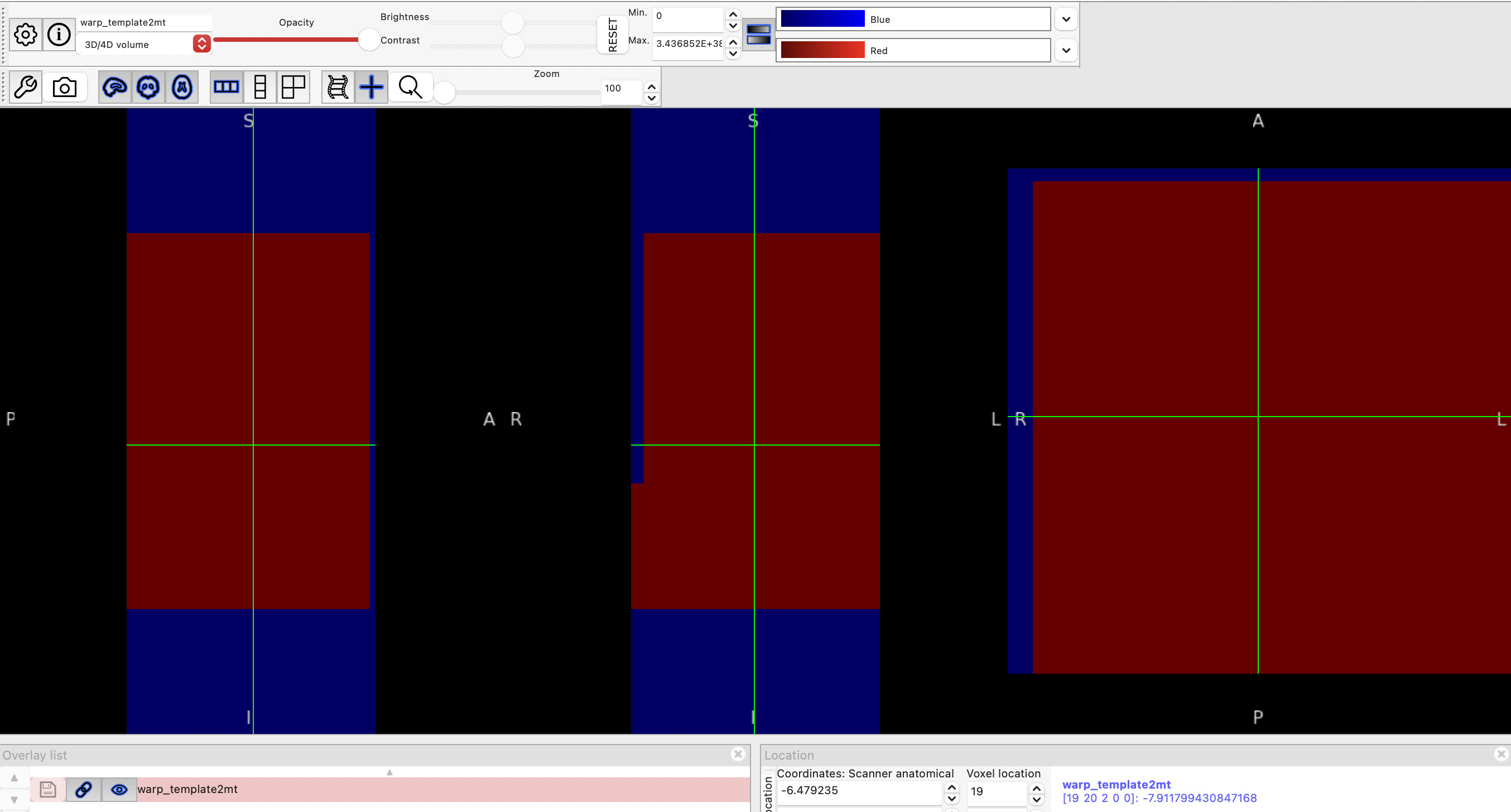
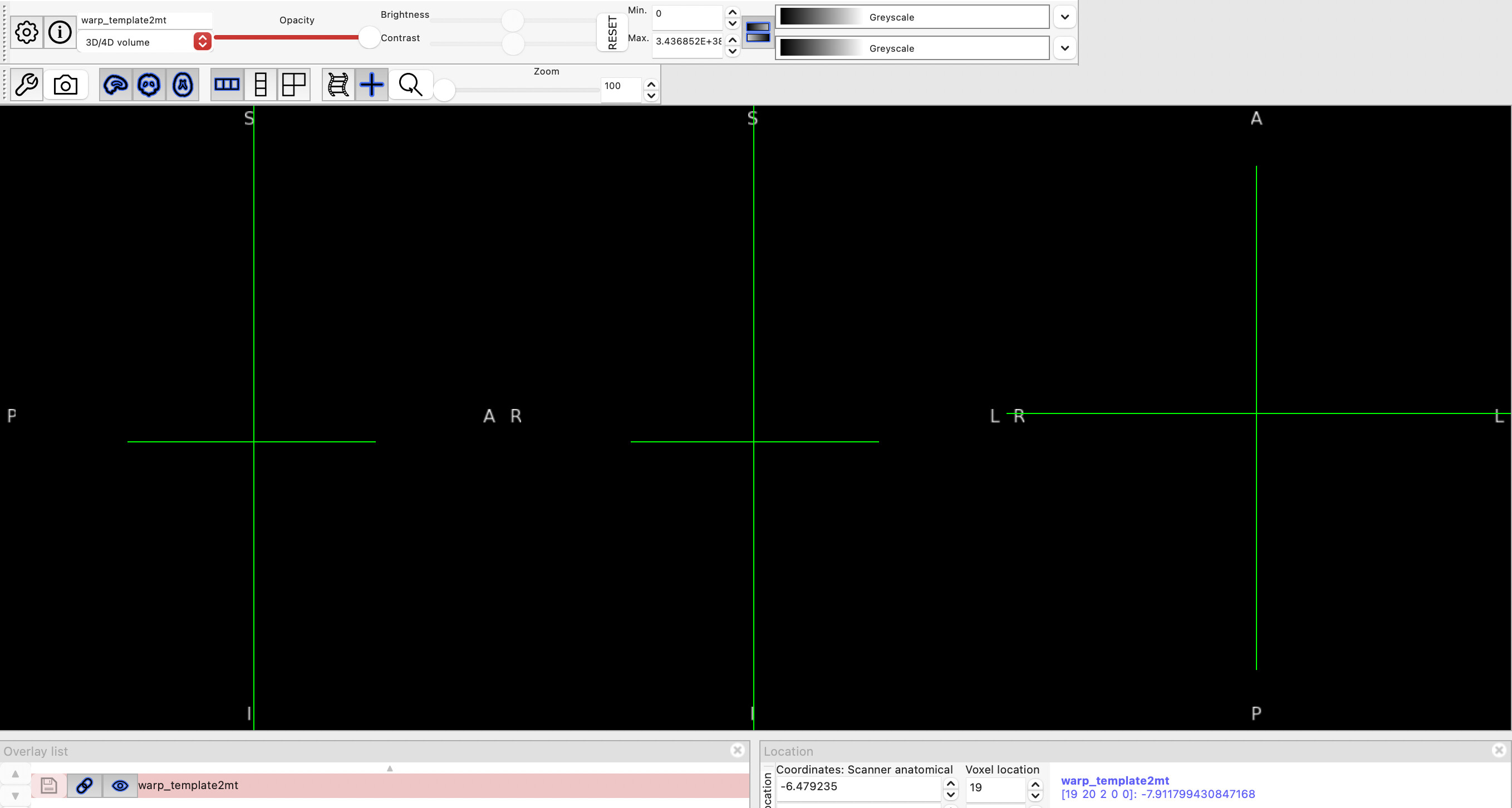
I am trying to run the sct_warp_template command on the mt1.nii.gz file, however the outputs appear to be blank when viewed in FSLeyes. The QC files are also blank. I have inspected the warp_template2mt.nii.gz file, and it seems to be strange - it looks blank in FSLeyes. I have attached the file. I can change the colour settings but it just creates large areas of colour (image attached).


warp_template2mt.nii.gz (43.5 KB)

From what I gathered on the SCT site, it shouldn’t look like this, right??

I think the lack of a proper warp file is what is causing the blank outputs. I have deleted and reinstalled the latest version (7.3) a couple of times in case I accidentally messed with the file at some point, but this has not resolved the issue.

Any help is greatly appreciated!

Thanks

Hi @hmac,

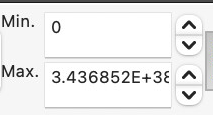
Visualizing warping fields is a bit tricky at first, since the default min/max values that FSLeyes chooses will not always be appropriate to use. For example, here, I notice that FSLeyes has chosen 0 as the minimum number, and an extremely large number as the max value:

image

Because of these defaults, any detail in the visualization is crushed.

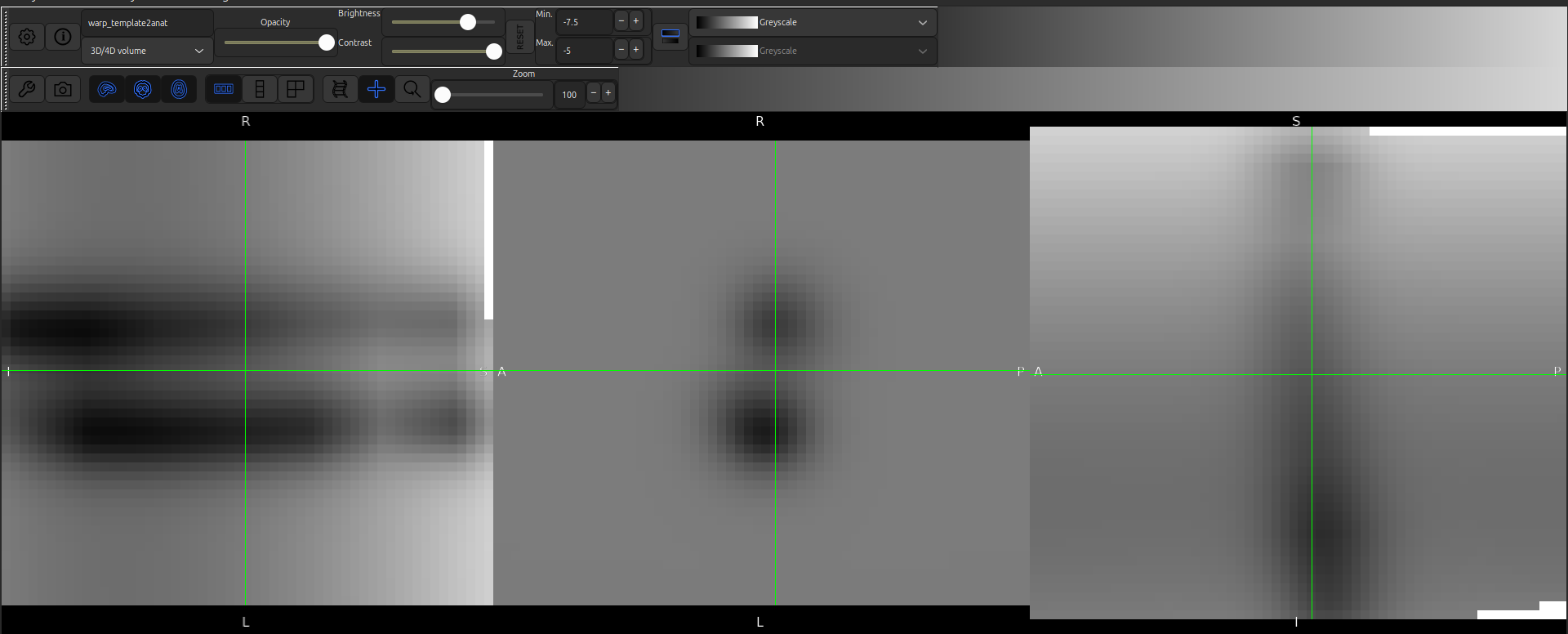
If you mouse over the data, you should see some typical values, and if you change the range to match the typical min/max values, you should begin to see a bit more detail in your visualization. For example, I played around with the values on one of my sample warping fields, and ended up with [-7.5, -5], which brought the image to life:

This is more of a quirk with FSLeyes, I think. Perhaps we could communicate this a bit better in our documentation. Was there a point in our documentation where you were prompted to run a FSLeyes command to open the warping field?

Kind regards,
Joshua

I see, thank you so much Joshua!

This worked for me when visualising the warp field. However, I ran the sct_warp_template command on the mt1.nii.gz file just then and it still did not give outputs that I can visualise (i.e. the wm/gm and atlases etc. appear blank). I tried hovering over them to get some voxel intensities, which was the solution for the warp field, but it constantly says zero… I am unsure why this is happening. I can view the mt1 file fine.

I only visualised the warp field because I was wondering if that was causing the output issues, it wasn’t explicitly prompted in the tutorials/website.

1 Like

Thanks for the clarification! It’s tricky for me to say based on my current knowledge of your data/commands/etc. but we can certainly still continue debugging.

Would you be able to share the commands that you ran and/or the data that you used? (e.g. was this directly following the MT tutorial on the SCT website, or was it using your own data, etc.)

Any information that could help me reproduce the issue would be helpful. :slight_smile:

Kind regards,
Joshua

I used the command as listed for warping the template with atlases included:

sct_warp_template -d mt1.nii.gz -w warp_template2mt.nii.gz -a 1 -qc qc

but i put the directory for the files instead of the name… this is the only way my computer lets me do it.

the command seems to run without errors (or at least it isn’t reporting that anything is wrong!).

i have tried this on my own data as well as the data given in the mt folder (as shown in the tutorial on the SCT website). same issue is happening.

Thanks for helping! I really appreciate it.

My apologies, but could you clarify a bit more what is happening?

For example, could you please copy and paste the full terminal log when you run this command? Something like this:


joshua@master >
$ [~/repos/sct_tutorial_data/single_subject/data/mt] # pwd
/home/joshua/repos/sct_tutorial_data/single_subject/data/mt
joshua@master >
$ [~/repos/sct_tutorial_data/single_subject/data/mt] # ls
total 3.9M
-rw-rw-r-- 1 joshua joshua  36K Mar 13 15:32 mask_mt1.nii.gz
-rw-rw-r-- 1 joshua joshua 1.1M Oct 28  2024 mt0.nii.gz
-rw-rw-r-- 1 joshua joshua 567K Mar 13 15:39 mt0_reg.nii.gz
-rw-rw-r-- 1 joshua joshua 1.2M Oct 28  2024 mt1.nii.gz
-rw-rw-r-- 1 joshua joshua 1.7K Mar 13 15:32 mt1_centerline.csv
-rw-rw-r-- 1 joshua joshua 3.8K Mar 13 15:32 mt1_centerline.nii.gz
-rw-rw-r-- 1 joshua joshua 117K Mar 13 15:32 mt1_crop.nii.gz
-rw-rw-r-- 1 joshua joshua 595K Mar 13 15:39 mt1_crop_reg.nii.gz
-rw-rw-r-- 1 joshua joshua  577 Mar 13 15:33 mt1_crop_seg.json
-rw-rw-r-- 1 joshua joshua 1.2K Mar 13 15:33 mt1_crop_seg.nii.gz
-rw-rw-r-- 1 joshua joshua 262K Mar 13 15:40 mtr.nii.gz
-rw-rw-r-- 1 joshua joshua  25K Mar 13 15:39 warp_mt1_crop2mt0.nii.gz
-rw-rw-r-- 1 joshua joshua 5.1K Mar 13 15:39 warp_mt02mt1_crop.nii.gz
-rw-rw-r-- 1 joshua joshua  44K Jun 11 10:49 warp_template2mt.nii.gz
joshua@master >
$ [~/repos/sct_tutorial_data/single_subject/data/mt] # sct_warp_template -d mt1.nii.gz -w warp_template2mt.nii.gz -a 1 -qc qc

--
Spinal Cord Toolbox (git-jn/3508-parallel-tutorial-testing-de628019e07e1c39a0da293794c35d6d4dfcf364)

sct_warp_template -d mt1.nii.gz -w warp_template2mt.nii.gz -a 1 -qc qc
--


Check parameters:
  Working directory ........ /home/joshua/repos/sct_tutorial_data/single_subject/data/mt
  Destination image ........ mt1.nii.gz
  Warping field ............ warp_template2mt.nii.gz
  Path template ............ /home/joshua/repos/spinalcordtoolbox/data/PAM50
  Output folder ............ label


WARP TEMPLATE:
File label/template/PAM50_t1.nii.gz already exists. Will overwrite it.
File label/template/PAM50_t2.nii.gz already exists. Will overwrite it.
File label/template/PAM50_t2s.nii.gz already exists. Will overwrite it.
File label/template/PAM50_cord.nii.gz already exists. Will overwrite it.
File label/template/PAM50_wm.nii.gz already exists. Will overwrite it.
File label/template/PAM50_gm.nii.gz already exists. Will overwrite it.
File label/template/PAM50_csf.nii.gz already exists. Will overwrite it.
File label/template/PAM50_levels.nii.gz already exists. Will overwrite it.
File label/template/PAM50_levels_continuous.nii.gz already exists. Will overwrite it.
File label/template/PAM50_label_body.nii.gz already exists. Will overwrite it.
File label/template/PAM50_label_disc.nii.gz already exists. Will overwrite it.
File label/template/PAM50_label_discPosterior.nii.gz already exists. Will overwrite it.
File label/template/PAM50_spine.nii.gz already exists. Will overwrite it.
File label/template/PAM50_centerline.nii.gz already exists. Will overwrite it.
File label/template/PAM50_spinal_midpoint.nii.gz already exists. Will overwrite it.
File label/template/PAM50_spinal_levels.nii.gz already exists. Will overwrite it.
File label/template/PAM50_rootlets.nii.gz already exists. Will overwrite it.
File label/template/PAM50_rootlets_midpoint.nii.gz already exists. Will overwrite it.
cp /home/joshua/repos/spinalcordtoolbox/data/PAM50/template/info_label.txt label/template

WARP ATLAS OF WHITE MATTER TRACTS:
File label/atlas/PAM50_atlas_00.nii.gz already exists. Will overwrite it.
File label/atlas/PAM50_atlas_01.nii.gz already exists. Will overwrite it.
File label/atlas/PAM50_atlas_02.nii.gz already exists. Will overwrite it.
File label/atlas/PAM50_atlas_03.nii.gz already exists. Will overwrite it.
File label/atlas/PAM50_atlas_04.nii.gz already exists. Will overwrite it.
File label/atlas/PAM50_atlas_05.nii.gz already exists. Will overwrite it.
# ...

By sharing the full log I will have a clearer understanding of which command is being run as well as any relevant terminal messages, and I can compare with my own run of the same command.

Thank you kindly for your patience and understanding! :slight_smile:

Kindly,
Joshua

Sure! I have included it below. One thing I don’t know how to fix (and it is probably a silly mistake from my end) is the fact that I have to type the whole path to the commands instead of just typing them.

terminal log

$ /path/to/sct_7.3/bin/sct_warp_template -d /path/to/sct_7.3/data/sct_testing_data/mt/mt1.nii.gz -w /path/to/sct_7.3/data/sct_testing_data/mt/warp_template2mt.nii.gz -a 1 -qc qc

Spinal Cord Toolbox (7.3)

sct_warp_template -d /path/to/sct_7.3/data/sct_testing_data/mt/mt1.nii.gz -w /path/to/sct_7.3/data/sct_testing_data/mt/warp_template2mt.nii.gz -a 1 -qc qc

Check parameters:

Working directory … /path/to

Destination image … /path/to/sct_7.3/data/sct_testing_data/mt/mt1.nii.gz

Warping field … /path/to/sct_7.3/data/sct_testing_data/mt/warp_template2mt.nii.gz

Path template … /path/to/sct_7.3/data/PAM50

Output folder … label

WARP TEMPLATE:

File label/template/PAM50_t1.nii.gz already exists. Will overwrite it.

File label/template/PAM50_t2.nii.gz already exists. Will overwrite it.

File label/template/PAM50_t2s.nii.gz already exists. Will overwrite it.

File label/template/PAM50_cord.nii.gz already exists. Will overwrite it.

File label/template/PAM50_wm.nii.gz already exists. Will overwrite it.

File label/template/PAM50_gm.nii.gz already exists. Will overwrite it.

File label/template/PAM50_csf.nii.gz already exists. Will overwrite it.

File label/template/PAM50_levels.nii.gz already exists. Will overwrite it.

File label/template/PAM50_levels_continuous.nii.gz already exists. Will overwrite it.

File label/template/PAM50_label_body.nii.gz already exists. Will overwrite it.

File label/template/PAM50_label_disc.nii.gz already exists. Will overwrite it.

File label/template/PAM50_label_discPosterior.nii.gz already exists. Will overwrite it.

File label/template/PAM50_spine.nii.gz already exists. Will overwrite it.

File label/template/PAM50_centerline.nii.gz already exists. Will overwrite it.

File label/template/PAM50_spinal_midpoint.nii.gz already exists. Will overwrite it.

File label/template/PAM50_spinal_levels.nii.gz already exists. Will overwrite it.

File label/template/PAM50_rootlets.nii.gz already exists. Will overwrite it.

File label/template/PAM50_rootlets_midpoint.nii.gz already exists. Will overwrite it.

cp /path/to/sct_7.3/data/PAM50/template/info_label.txt label/template

WARP ATLAS OF WHITE MATTER TRACTS:

File label/atlas/PAM50_atlas_00.nii.gz already exists. Will overwrite it.

File label/atlas/PAM50_atlas_01.nii.gz already exists. Will overwrite it.

File label/atlas/PAM50_atlas_02.nii.gz already exists. Will overwrite it.

File label/atlas/PAM50_atlas_03.nii.gz already exists. Will overwrite it.

File label/atlas/PAM50_atlas_04.nii.gz already exists. Will overwrite it.

File label/atlas/PAM50_atlas_05.nii.gz already exists. Will overwrite it.

File label/atlas/PAM50_atlas_06.nii.gz already exists. Will overwrite it.

File label/atlas/PAM50_atlas_07.nii.gz already exists. Will overwrite it.

File label/atlas/PAM50_atlas_08.nii.gz already exists. Will overwrite it.

File label/atlas/PAM50_atlas_09.nii.gz already exists. Will overwrite it.

File label/atlas/PAM50_atlas_10.nii.gz already exists. Will overwrite it.

File label/atlas/PAM50_atlas_11.nii.gz already exists. Will overwrite it.

File label/atlas/PAM50_atlas_12.nii.gz already exists. Will overwrite it.

File label/atlas/PAM50_atlas_13.nii.gz already exists. Will overwrite it.

File label/atlas/PAM50_atlas_14.nii.gz already exists. Will overwrite it.

File label/atlas/PAM50_atlas_15.nii.gz already exists. Will overwrite it.

File label/atlas/PAM50_atlas_16.nii.gz already exists. Will overwrite it.

File label/atlas/PAM50_atlas_17.nii.gz already exists. Will overwrite it.

File label/atlas/PAM50_atlas_18.nii.gz already exists. Will overwrite it.

File label/atlas/PAM50_atlas_19.nii.gz already exists. Will overwrite it.

File label/atlas/PAM50_atlas_20.nii.gz already exists. Will overwrite it.

File label/atlas/PAM50_atlas_21.nii.gz already exists. Will overwrite it.

File label/atlas/PAM50_atlas_22.nii.gz already exists. Will overwrite it.

File label/atlas/PAM50_atlas_23.nii.gz already exists. Will overwrite it.

File label/atlas/PAM50_atlas_24.nii.gz already exists. Will overwrite it.

File label/atlas/PAM50_atlas_25.nii.gz already exists. Will overwrite it.

File label/atlas/PAM50_atlas_26.nii.gz already exists. Will overwrite it.

File label/atlas/PAM50_atlas_27.nii.gz already exists. Will overwrite it.

File label/atlas/PAM50_atlas_28.nii.gz already exists. Will overwrite it.

File label/atlas/PAM50_atlas_29.nii.gz already exists. Will overwrite it.

File label/atlas/PAM50_atlas_30.nii.gz already exists. Will overwrite it.

File label/atlas/PAM50_atlas_31.nii.gz already exists. Will overwrite it.

File label/atlas/PAM50_atlas_32.nii.gz already exists. Will overwrite it.

File label/atlas/PAM50_atlas_33.nii.gz already exists. Will overwrite it.

File label/atlas/PAM50_atlas_34.nii.gz already exists. Will overwrite it.

File label/atlas/PAM50_atlas_35.nii.gz already exists. Will overwrite it.

File label/atlas/PAM50_atlas_36.nii.gz already exists. Will overwrite it.

cp /path/to/sct_7.3/data/PAM50/atlas/info_label.txt label/atlas

Resampling image “mt1.nii.gz” to 0.6x0.6 mm

Resampling image “PAM50_wm.nii.gz” to 0.6x0.6 mm

Compute center of mass at each slice

/path/to/sct_7.3/python/envs/venv_sct/lib/python3.10/site-packages/scipy/ndimage/_measurements.py:1548: RuntimeWarning: invalid value encountered in scalar divide

results = [sum_labels(input * grids[dir].astype(float), labels, index) / normalizer

***** Generating Quality Control (QC) html report *****

/path/to/qc/data/sct_testing_data/mt/sct_warp_template/2026_06_12_002227.940179/background_img.png

Successfully generated the QC results in /path/to/qc/_json/qc_2026_06_12_002227.940179.json

To see the results in a browser, type:

open /path/to/qc/index.html

Done! To view results, type:

fsleyes sct_7.3/data/sct_testing_data/mt/mt1.nii.gz -cm greyscale -a 100.0 label/template/PAM50_t2.nii.gz -cm greyscale -dr 0 4000 -a 100.0 label/template/PAM50_gm.nii.gz -cm YlOrRd -dr 0.4 1 -a 50.0 label/template/PAM50_wm.nii.gz -cm blue-lightblue -dr 0.4 1 -a 50.0 &

Total runtime; 40.047 seconds.

Thanks for helping. I’m not super savvy with terminal so I really appreciate it.
1 Like

It is not a worry! SCT and terminal use have a bit of a learning curve, and we are happy to help wherever we can to make things easier for you. :slight_smile:

(I am working under the assumption that you replaced your real paths in the logs with /path/to/ for the sake of privacy! This is A-OK.)

You are right, I don’t see any big errors or anything like that in the logs. They look more or less the same as my local run: Test run vs. joshua's run - Diffchecker


I do think I’ve identified the problem, though: The testing data you are accessing is not the one that we recommend for users.

  • sct_testing_data: This is the dataset that gets referenced in your logs. This is a small dataset used internally in our automated testing. It contains cropped images to reduce the processing time.
  • sct_tutorial_data: The dataset used in the online tutorials. This contains full-sized images more appropriate for “at home testing”’ for users. It gets split up into multiple individual datasets, one per tutorial (example).

So, when you follow the web tutorials, it is recommended to stick just to the full-sized sample data.


To help with the terminal commands, here are some instructions

  1. I am assuming you are following this tutorial: Coregistering additional data (MT, DT) to the PAM50 template - Spinal Cord Toolbox documentation (Please feel free to correct me if I’m wrong and I can revise the instructions accordingly!)
  2. Download the .zip file from the start of the tutorial.
  3. In Finder, open the unzipped directory containing the data.
  4. Open the directory from Finder in the Terminal using these instructions: Open new Terminal windows and tabs on Mac - Apple Support (EG) (“Open new Terminal windows or tabs from the Finder” section)
  5. Confirm that the correct files are present in the terminal by running the ls command.
  6. Proceed with the tutorial instructions from that directory.

An important note: When working with your own data, you won’t just be able to reuse the warp_template2anat.nii.gz file, as it is specific to the tutorial data that is distributed alongside it. For your own data, you will need to generate a warp_template2anat.nii.gz file from scratch. But, we provide instructions for this here: Registration Option 2: Direct registration to the template - Spinal Cord Toolbox documentation. (Note that this page expects the entire tutorial to be completed beforehand, including segmentation.)


My deepest apologies if any of these details were unclear when following the information on our website. If you have any feedback on how we can make these details clearer, or any further questions, please don’t hesitate to mention them. :slight_smile:

Kind regards,
Joshua

Thanks Joshua!

I did also try with my own data and it still didn’t work… maybe I have skipped tutorial steps.

I was following the instructions in this section of the tutorial online: Transforming the GM/WM atlas to the MT space using warping fields - Spinal Cord Toolbox documentation

I see that there is another section to do region-based analysis as per what you linked.

Just curious - I want to do PAM50 atlas-based analysis of my data. Maybe I am confusing myself. Is there a difference between the link you sent and the one I attached, or does one follow the other? I assume the mistake I was making was not generating the specific warp field from my data which I should’ve done earlier.

I think I will need to start from the beginning of the tutorial again a bit more carefully this time. I don’t think it’s your fault with how the tutorial is set out, I think I rushed through it. :joy:

Ah, yes, your situation is much clearer then!

You’ve diagnosed it exactly. There’s a little intro section at the start of the tutorial (Before starting this tutorial - Spinal Cord Toolbox documentation):

This tutorial demonstrates how to extract the MTR from specific tracts of the GM/WM atlas. Necessarily, then, we will re-use the results from the previous MTR and MT registration tutorials:

While doing all three tutorials isn’t strictly necessary when working with the sample data, it definitely is necessary when using your own data, as the sample warping fields, mtr file, etc. are only valid for the sample data. (I would also recommend working through the tutorials in sequence regardless, just to build your understanding of the overall pipeline, too!)

Not a worry at all! It’s totally understandable. :joy:

Don’t hesitate to reach out if you have any other issues. :slight_smile: